
Communication is easier when language is no longer a barrier. Whether you are traveling, studying, working with international clients, reading foreign websites, or simply trying to understand a message in another language, Google Translate can be a useful everyday tool.
Google Translate is designed to help people understand words, sentences, documents, and conversations across many languages. It is simple enough for beginners while also offering practical features for students, professionals, travelers, and content readers.
This guide explains how to use Google Translate effectively, where it works best, and how to get more accurate and useful translations.
What Is Google Translate?
Google Translate is a translation service from Google that helps users convert text from one language into another.
You can use it for simple words, complete sentences, longer passages, website content, and other supported translation tasks. Depending on the device and available features, users may also be able to work with speech, images, documents, or conversations.
The main advantage of Google Translate is convenience. Instead of searching for every unfamiliar word individually, users can quickly get a translation and understand the general meaning of the content.
It is especially useful when you need fast assistance rather than a professionally certified translation.
Why Google Translate Is Useful
Google Translate can support many everyday situations.
For example, a traveler may use it to understand a sign, a student may use it to understand a foreign-language paragraph, and a business owner may use it to understand a basic customer message.
Some common benefits include:
- Fast translation of words and sentences
- Easy access from phones and computers
- Support for many languages
- Useful pronunciation assistance
- Convenient translation while traveling
- Helpful support for language learners
- Quick understanding of foreign-language content
The service is designed to make multilingual information easier to access.
How to Use Google Translate for Text
Using Google Translate for basic text is straightforward.
Step 1: Choose the Source Language
Select the language of the original text.
If you are unsure which language is being used, automatic language detection may help identify it.
Step 2: Choose the Target Language
Select the language you want the text translated into.
For example, you could translate English into Spanish, French into English, or another supported language combination.
Step 3: Enter Your Text
Type or paste the content into the translation box.
For better results, use clear sentences with proper punctuation. Very long, confusing, or incomplete sentences can sometimes produce less natural translations.
Step 4: Review the Translation
Read the translated version carefully.
For casual communication, the result may be enough immediately. For important business, legal, medical, academic, or official communication, however, human review is still recommended.
Google Translate Features at a Glance
Here is a simple overview of common Google Translate uses.
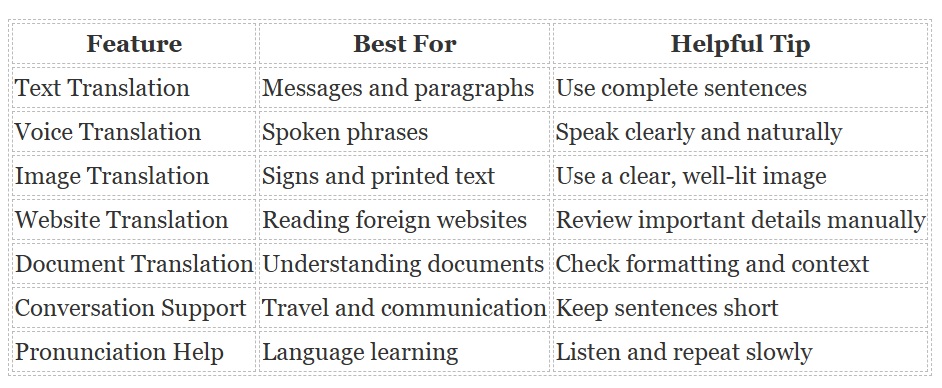
Different features may vary depending on language, device, region, and platform.
How to Get Better Translation Results
Machine translation works best when the original content is clear.
Write Simple and Complete Sentences
Avoid unnecessarily complicated sentence structures.
For example, instead of writing:
“Regarding the thing we talked about before, if possible, maybe send it.”
A clearer sentence would be:
“Please send the document we discussed yesterday.”
The clearer version gives the translation system more context.
Avoid Too Much Slang
Local slang, internet expressions, abbreviations, and regional jokes may not translate accurately.
If possible, replace slang with standard language before translating.
Check Names and Brand Terms
Proper names, product names, company names, technical terms, and branded phrases may not always need translation.
Always check that these terms remain correct in the translated text.
Translate Meaning, Not Just Words
Languages do not always follow identical sentence structures.
A natural translation may use different words while preserving the same meaning. Therefore, it is better to focus on whether the translated sentence communicates the original idea correctly.
Using Google Translate While Traveling
Google Translate can be especially useful for travelers.
You may use it to understand:
- Restaurant menus
- Transportation information
- Hotel instructions
- Basic conversations
- Direction signs
- Shopping information
- Short local messages
When speaking with someone who uses another language, short and direct sentences generally work better than long explanations.
For example:
“Where is the train station?”
is easier to translate accurately than a long sentence containing several questions at once.
Using Google Translate for Learning
Google Translate can also support language learning when used correctly.
Students can compare words, listen to pronunciation, explore sentence structures, and understand unfamiliar phrases.
However, it should not completely replace language study.
Use It as a Learning Assistant
A useful approach is to first try translating a sentence yourself.
Then compare your version with Google Translate.
Ask yourself:
- Did I choose the correct verb?
- Is the sentence structure different?
- Are there alternative meanings?
- How is the word pronounced?
- Does the translated version sound natural?
This approach turns translation into an active learning exercise.
Google Translate for Work and Business
Professionals may use Google Translate for basic international communication.
It can be helpful when reading inquiries, understanding short messages, reviewing foreign-language pages, or preparing a rough translation before human editing.
However, businesses should be careful with sensitive or high-impact content.
Important contracts, legal agreements, financial instructions, healthcare information, marketing campaigns, and official documents should generally be reviewed by a qualified professional translator when accuracy is critical.
Is Google Translate Always Accurate?
No translation tool is perfect.
Accuracy can depend on several factors, including:
- Language pair
- Sentence complexity
- Context
- Regional expressions
- Technical vocabulary
- Grammar
- Ambiguous words
Common language combinations may often produce strong results for everyday communication, while highly specialized or context-dependent text may require additional review.
A single word can also have different meanings.
For example, the meaning of a word may change depending on whether the subject is technology, medicine, business, sports, or everyday conversation.
Context matters.
When Should You Use a Human Translator?
Google Translate is useful for speed and convenience, but professional translation may be more appropriate in certain situations.
Consider human translation for:
- Legal documents
- Medical instructions
- Government paperwork
- Academic publications
- Important business contracts
- Immigration documents
- Professional marketing campaigns
- Content where tone and cultural meaning are critical
Human translators can understand context, cultural references, tone, emotion, and specialized terminology in ways that automated systems may sometimes miss.
Privacy and Responsible Use
Users should also think carefully before entering sensitive information into any online service.
Avoid unnecessarily sharing confidential passwords, private financial information, personal identification details, confidential client records, or other sensitive content.
For workplace use, follow your organization’s security and privacy policies.
Responsible use is especially important when translating private or confidential information.
Google Translate Can Make Global Communication Easier
Google Translate is a practical technology tool for people who regularly encounter different languages.
Its biggest strength is accessibility. A foreign sentence that once required a dictionary or specialist can often be understood within seconds.
For travel, study, everyday reading, casual communication, and basic research, it can save considerable time.
The best results come from using clear language, reviewing important translations, and understanding when professional human assistance is needed.
Final Thoughts
Google Translate has made multilingual communication more accessible for people around the world.
It can help users understand unfamiliar languages, communicate while traveling, explore international information, and support language learning.
For everyday translation, it offers a fast and convenient solution. For important or specialized content, combining technology with human review remains the safest approach.
Used thoughtfully, Google Translate can be much more than a simple word converter. It can serve as a helpful bridge between languages, cultures, and people.